Remotion vs React Video Editor: Engine vs Embedded Editor
A developer-focused comparison of Remotion's rendering engine and React Video Editor, the timeline and editing layer built on top of Remotion for embedded browser-based editors.
Sam
Creator of RVE
Install the editor package here if you want to test the product layer quickly:
npm install @react-video-editor/core remotion @remotion/playerAnd if you want to see the editing UX before reading further, try the live demo: React Video Editor demo.
There’s been some confusion recently around licensing between Remotion and React Video Editor, and also around what each product actually does. That confusion is understandable: both use React, both deal with video, and both show up for similar search queries.
But to be clear: RVE wouldn’t exist without Remotion. This post is here to explain how the two fit together, what each one is responsible for, and when you need one versus both.
If your immediate question is specifically about licensing, also read Is Remotion Free? What the License Covers and When You Need More. If your search is really about Remotion transitions, Remotion animations, or Remotion effects, read Remotion Transitions vs React Video Editor. If you want the bigger architecture picture, read How to Build a Video Editor in React.
Remotion is the engine
Remotion is the low-level engine that lets developers build videos with React components and render them frame by frame. You write compositions, sequences, animations, and data-driven scenes in code, then Remotion handles previewing and rendering.
Think of Remotion like the rendering and composition layer for a video app. It gives you precise control, but it does not give you a complete end-user editor experience by default.
If you are building a custom video product from scratch, Remotion is what you reach for first.
That route is powerful, but it also means you still need to build things like:
- a timeline UI
- media uploads and asset management
- overlays and layer controls
- captions workflows
- undo/redo and editor state
- rendering jobs, export controls, and app wiring
If that’s the route you’re considering, it’s worth reading Build vs Buy a Video Editor and Open Source React Video Editor: What You Get, What You Still Need.
React Video Editor is the product layer around Remotion
Everything you see in RVE, from previews to final exports, is powered by Remotion under the hood. RVE takes that raw engine and wraps it in a working editing experience developers can integrate into a real app.
That includes things like:
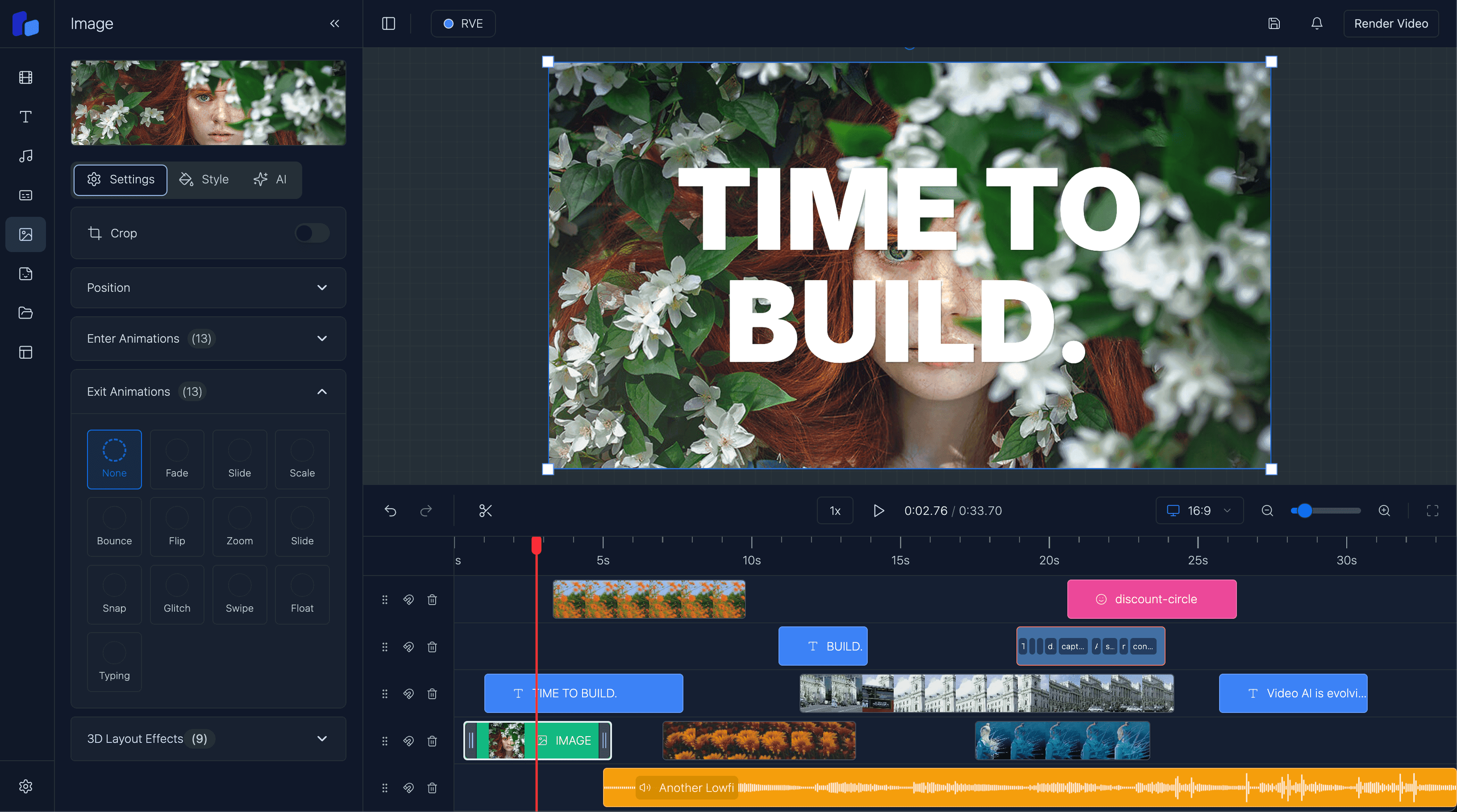
- Timeline editing
- Captions workflows
- Overlay management
- Transitions and effects
- Rendering and integration paths via the getting started guide
So if your query is really “is Remotion a video editor?”, the better answer is: Remotion is the rendering foundation; RVE is the editor UX and workflow layer.
That distinction matters most for teams building:
- embedded SaaS editors
- AI video apps that still need human review
- white-label products where the editor lives inside the host app
- internal tools that need timeline editing without rebuilding everything from scratch
Code example: using Remotion inside React Video Editor
A common search intent behind remotion video editor is not just “what is Remotion?” but “how do I actually turn a Remotion composition into an editor?” Here’s a minimal example using the real RVE package:
"use client";

import { ReactVideoEditor } from "@react-video-editor/core";
import { AbsoluteFill, Sequence, spring, useCurrentFrame, useVideoConfig } from "remotion";

function IntroCard() {
  const frame = useCurrentFrame();
  const { fps } = useVideoConfig();
  const scale = spring({ frame, fps, config: { damping: 14 } });

  return (
    <AbsoluteFill
      style={{
        background: "linear-gradient(135deg, #0f172a, #2563eb)",
        color: "white",
        alignItems: "center",
        justifyContent: "center",
        fontSize: 64,
        fontWeight: 700,
        transform: `scale(${scale})`,
      }}
    >
      Remotion scene inside RVE
    </AbsoluteFill>
  );
}

export default function EditorPage() {
  return (
    <ReactVideoEditor
      projectId="remotion-vs-rve-example"
      fps={30}
      defaultTracks={[
        {
          id: "intro-track",
          type: "composition",
          items: [
            {
              id: "intro-card",
              type: "composition",
              from: 0,
              durationInFrames: 120,
              component: () => (
                <Sequence from={0} durationInFrames={120}>
                  <IntroCard />
                </Sequence>
              ),
            },
          ],
        },
      ]}
    />
  );
}
That example is the practical difference:
- Remotion defines the visual composition.
- React Video Editor gives you the editor shell where users can work with that composition.
If you want the full setup path, start with Getting Started and then compare the product-ready workflow with the free Remotion templates and examples page.
Is Remotion free and open source?
This is one of the biggest query clusters landing on this page, so here’s the concise answer.
Remotion can be free to use, but the exact answer depends on the license terms for your use case. For example, individuals, evaluators, some non-profits, and small for-profit teams can often use it under the free tier, while larger for-profit companies need a paid company license.
If you want the exact details, read the official Remotion license and the RVE explainer: Is Remotion Free?.
If your real question is whether Remotion alone gives you a complete open-source browser editor, the answer is usually no. It gives you the rendering foundation, not the entire product surface.
What does that mean for licensing?
Because RVE is built on top of Remotion, both licenses apply when you're using RVE in a commercial context.
If you're experimenting or building for yourself, you're likely fine. But if you're shipping a product, selling access, or using RVE in a revenue-generating workflow, here’s what to know:
- Remotion’s license – Remotion uses its own published license model. Many individuals, non-profits, evaluators, and for-profit teams with up to 3 employees can use it under the free tier, while larger for-profit organizations need a company license. Read their terms for the current details.
- RVE’s license – RVE has its own commercial license, separate from Remotion. It's designed for developers and teams who want to use RVE in production, with different tiers depending on the use case.
That’s why the right way to think about this is not Remotion or RVE, but often Remotion plus RVE when you want both the rendering engine and a usable editor foundation.
When should you use each?
Use Remotion alone if:
- you want maximum control
- you are comfortable building editor UX yourself
- you mainly need composition and rendering
- your product does not need a polished in-app editing interface yet
Use React Video Editor if:
- you want to embed a real editor into your app faster
- you need timeline editing, overlays, captions, and controls now
- you want a React-native integration path instead of a separate editing product
- you want to stand up a browser-based editor without rebuilding the UI layer from zero
Wrapping it up
- Remotion gives you the engine.
- React Video Editor gives you the editor layer around it.
- If you're using both commercially, both licenses matter.
If you want to evaluate the package directly, start with the install guide, test the live demo, and compare it with the timeline feature page to see what you get beyond the rendering engine alone.
Sam
Creator of RVE