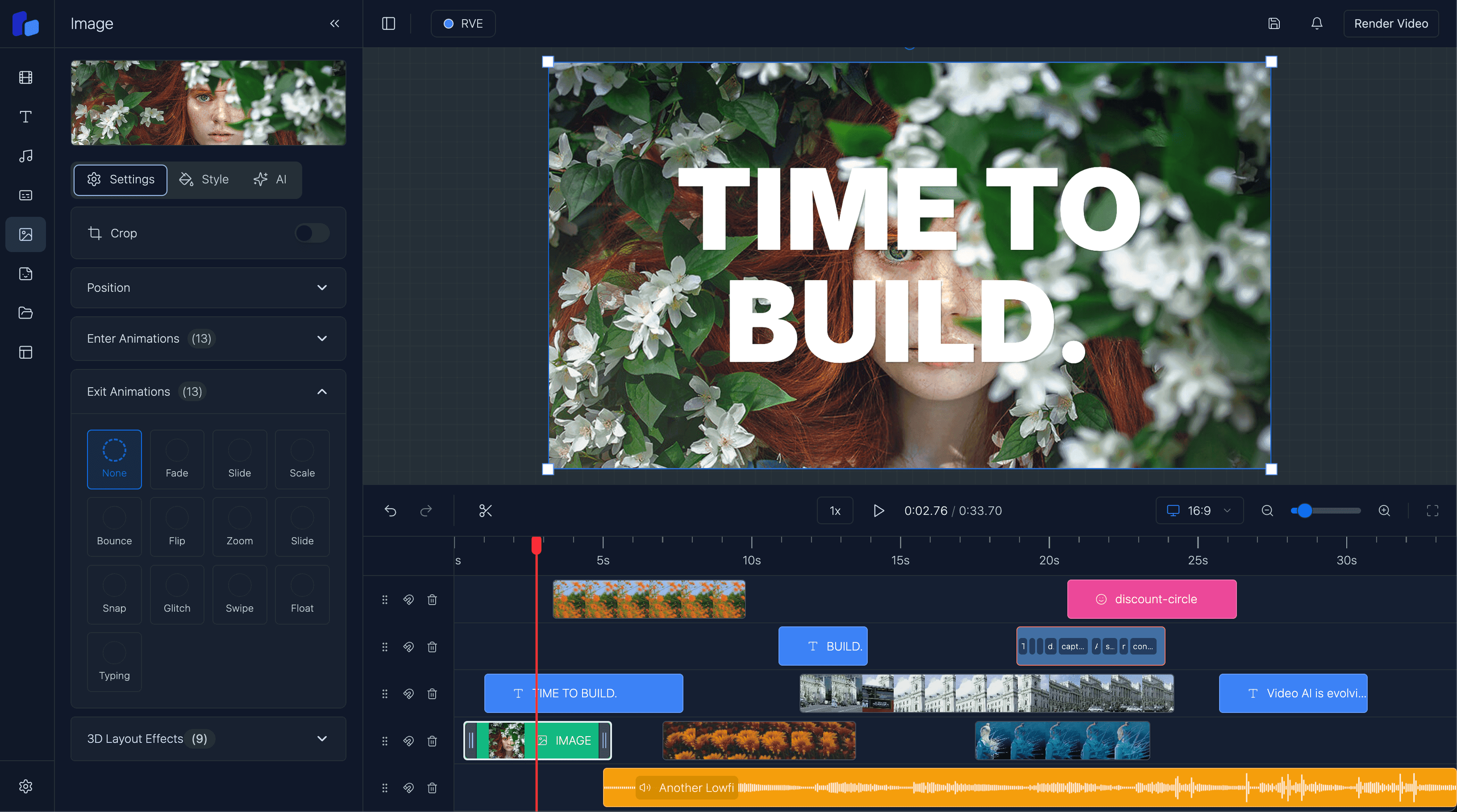
React Video Editor for SaaS
A practical guide for SaaS teams embedding video editing into their product without rebuilding timeline, captions, uploads, and rendering infrastructure from scratch.
Sam
Creator of RVE
If you are building a SaaS product with embedded video editing, the real question is not whether users can edit videos in your app.
It is whether editing is the product, or whether editing supports the product.
Key takeaways
- Most SaaS teams do not need to invent the editor from zero; they need an editor that fits their workflow.
- The biggest value usually lives in templates, automation, approvals, and distribution rather than timeline infrastructure itself.
- A React-native editor foundation makes sense when you still need customization without owning every low-level editor system.
If you are still working out the technical surface area, read How to Build a Video Editor in React and Web-Based Video Editor Architecture. This page is the buyer-focused version of that decision.
The SaaS framing that matters
A SaaS product usually does not win because its timeline is slightly better than everyone else’s.
It wins because the editing workflow is attached to something else valuable:
- customer data already inside the product
- templates tied to a real use case
- approvals and collaboration
- publishing and distribution
- AI generation or automation
- a vertical-specific workflow for a real niche
That means the editing layer needs to be reliable, embeddable, and customizable - but it usually does not need to be invented from scratch.
If this is you
- Your users need to create videos without leaving the product they already pay for.
- The workflow around the editor is more important than inventing a new editor interaction model.
- You want users to move from generation, data, or templates into editing without bouncing to another tool.
Where embedded editing makes the most sense
AI video apps that still need human review
Generation is not the whole product. Users still want to fix timing, swap scenes, update captions, change branding, and export variants.
Marketing and social tools
If your product creates ads, promos, or campaign variations, users often need fast editing inside the same workflow that produced the assets.
Internal enablement or support platforms
Teams creating onboarding, support, or training videos benefit from keeping editing inside the system where the underlying knowledge and assets already live.
UGC, creator, and review workflows
Products handling user-generated content or collaborative review often need real editing: trim, captions, overlays, and export - but not necessarily a from-scratch editor platform.
Why embedding RVE can work well
- You can ship a reliable editing baseline faster.
- You keep users inside your product instead of handing them off to another tool.
- Your team spends more time on the workflow users buy for rather than core editor plumbing.
Where SaaS teams still need to own the product layer
- You still need to own auth, billing, permissions, templates, and workflow design.
- You still need product-specific integrations for uploads, jobs, and delivery.
- You should not expect the editor foundation to define your market position for you.
What SaaS teams underestimate
The visible editor UI is only the first layer.
Once a team scopes embedded video editing, the real work usually includes:
- a timeline with drag, resize, snapping, and selection state
- captions, overlays, transitions, and templates
- uploads, storage references, and media metadata
- autosave and durable project persistence
- preview that matches export behavior
- render jobs, retries, and delivery
- theming so the editor fits the host product
That is why teams often start by searching for a React video editor SDK or white-label video editor in React and end up evaluating half a media stack. If branding, embedded UX ownership, and account-level workflow control are the main requirements, read White-Label Video Editor in React.
The best use cases for an embedded SaaS editor
1. AI video apps that still need human review
Generation is not the whole product.
Users still want to fix timing, swap scenes, update captions, change brand styling, and export variants. That is where an embedded editor closes the gap between AI output and usable content. If that is your main evaluation path, read React Video Editor for AI Video Apps.
2. Marketing and social tools
If your SaaS creates ads, product promos, short-form clips, or campaign variants, users need fast editing without leaving the workflow that generated the content.
3. Internal enablement or customer success platforms
A lot of SaaS products use video as part of onboarding, support, or training. Embedding editing directly into the app helps teams create and update those assets without moving across multiple tools.
4. UGC, creator, and review workflows
Products that manage creator submissions, user-generated content, or collaborative approvals often need lightweight but real editing: trim, crop, captions, overlays, and final export.
What buying the foundation should still let you own
Using a React editor foundation should not mean giving up product control.
A SaaS team should still control:
- the surrounding app shell and navigation
- auth, billing, permissions, and project access
- product-specific templates and workflows
- storage and upload strategy
- render job triggers and delivery logic
- product styling and feature gating
That is the point of a React-native foundation instead of a locked external editor.
Option A
Use RVE when the editor supports a bigger workflow
- Your moat is workflow, collaboration, AI, templates, or domain-specific logic.
- Users benefit from editing inside your product rather than leaving it.
- Speed to a trustworthy baseline matters more than owning every low-level behavior.
Option B
Build more yourself when the editor is the product
- The editing interaction model itself is the core differentiator.
- Your UX is highly unusual and not well-served by an existing baseline.
- You are intentionally investing in a long-lived editor platform.
Questions readers usually ask
Next step
If editing supports a bigger SaaS workflow, keep the team focused on that workflow
Use the editor as leverage, not as a detour. Put your roadmap into the automation, collaboration, templates, and product logic users actually pay for.