
RVE Pro Source Template
Get started with the complete RVE Pro Version 8 source-code template
RVE Pro is the complete Version 8 Next.js source-code template. You receive a working video editor through a private GitHub repository, with code that your team can change, host, and maintain.
We created RVE Pro so teams could avoid rebuilding the same editor foundation while keeping full ownership of the code. The tradeoff is that your team owns updates and maintenance after you change the template.
View RVE Pro, read why RVE has both a source template and an SDK, or compare both products.
Choose RVE Pro when you:
- Need complete source-code ownership
- Want to change any part of the editor
- Want to host the full application yourself
- Are ready to maintain your version of the template
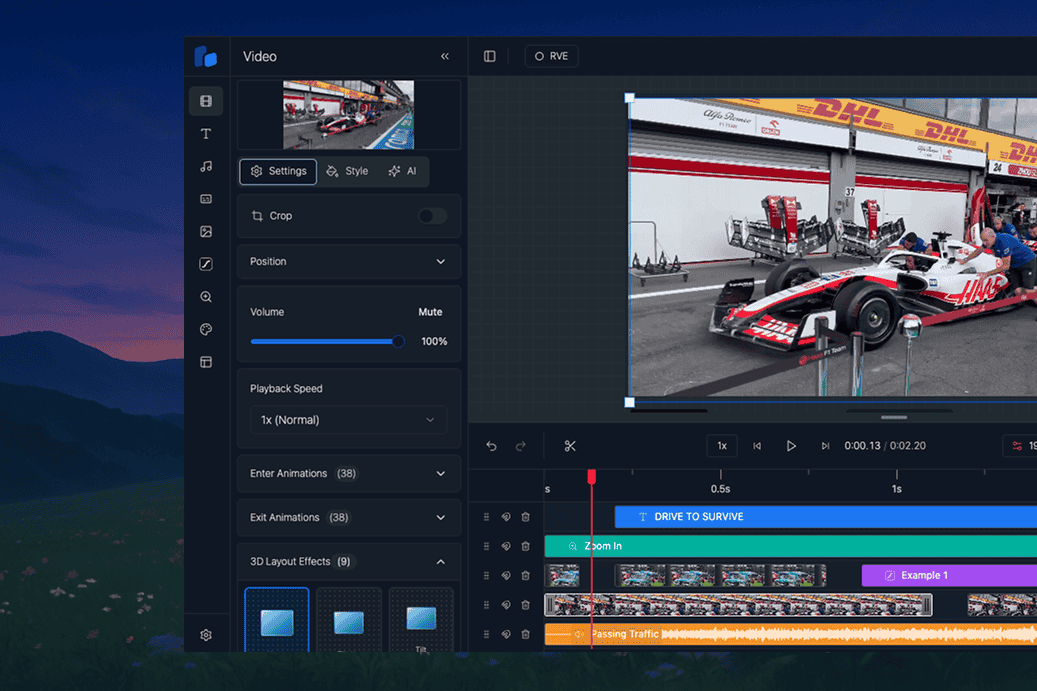
What the source template includes
RVE Pro is a working Next.js video editor made from modular React components. Use the complete application or move the parts you need into your product.
What you get out of the box:
- Timeline editing – A drag-and-drop timeline to arrange clips, audio, text, and more
- Live preview – See changes as you go, frame by frame
- Multi-track support – Add layers for video, audio, subtitles, overlays, etc.
- Customizable UI – Make it match your product or brand, no rigid templates
Your team owns the resulting codebase and decides how it changes.
Quick Example
Here’s a minimal example to get started:
"use client";

import React from 'react';
import { APP_CONFIG } from "../constants";
import { HttpRenderer } from '../../lib/http-renderer';
import { ReactVideoEditor } from '@react-video-editor/core';

export default function Page() {
  const PROJECT_ID = "example-project";

  const lambdaRenderer = React.useMemo(() =>
    new HttpRenderer('/api/render/lambda', {
      type: 'lambda',
      entryPoint: '/api/render/lambda'
    }), []
  );

  return (
      <ReactVideoEditor
        projectId={PROJECT_ID}
        defaultOverlays={DEFAULT_PROJECT_OVERLAYS}
        fps={APP_CONFIG.fps}
        renderer={lambdaRenderer}
        showDefaultThemes={true}
      />
  );
}
How does it work?
RVE Pro is a Next.js app template. When you buy RVE Pro, you get a fully working Next.js application that runs locally and deploys like any other Next.js project. Inside that app, the editor itself is composed of modular React components (Timeline, tracks, overlays, renderers, etc.), so you can drop them into your own flows or customize them heavily.
Why Next.js?
- App-template ready: clone, install, run
- SSR/ISR friendly: great DX and production performance
- API routes: perfect for render jobs, webhooks, and uploads
- Easy deploys: Vercel, AWS, or your platform of choice
While RVE Pro ships as a Next.js app, many of our customers also run RVE inside Vite, CRA, Remix, and other React setups. The core editor components aren’t locked to Next.js - you can pull them into whatever build system you prefer.
Check out the integration guides for examples of using RVE with different frameworks and bundlers.
How some people have been using RVE
- Indie devs building AI tools for YouTube Shorts and Reels
- Startups adding browser-based editors to existing products
- Enterprises replacing old downloadable editors with modern web tools
- Agencies building white-label editors for clients
- Teams prototyping internal video tools without starting from scratch
Next Steps
- Install RVE – Start with the installation guide
- Explore Components – Get familiar with the building blocks
- Understand Rendering – Explore the different rendering options
- Understand the product choice – Read why RVE has both Pro and the SDK